DeepSeek-V4-Flash-0731 on 2x DGX Spark
In this tutorial, you will run the DeepSeek-V4-Flash-0731 large language model across two DGX Sparks using sparkrun. This model is a Mixture-of-Experts model with 284 billion total and 13 billion active parameters. Additionally, before running it, we will examine how intelligent the model is.
The Spark can be used as a standalone computer by connecting a monitor and keyboard, or as a remote server accessed from another computer. In this tutorial, we will connect to the Spark remotely and install the necessary software to run the model.
We will use vLLM as the inference engine and sparkrun as the management tool. vLLM will load the model’s trained weights into GPU memory and expose an API that accepts external requests. sparkrun will manage Docker containers and model deployment across Sparks from the command line. This way, operations such as image synchronization, model transfer, and cluster configuration will be automated. Both will run on the Main Spark, inside Docker containers.
This tutorial consists of six parts:
- Model Intelligence: Tests that measure the intelligence of AI models, how they differ from performance tests, and DeepSeek-V4-Flash-0731’s position among leading models
- Setup: Downloading the Docker image and preparing the recipe
- Running: Starting, monitoring, and testing the model on two DGX Sparks with sparkrun
- Benchmark: Performance measurement results at different concurrency levels
- Using with OpenCode: Connecting the model to a local coding assistant
- Shutdown: Stopping the services
Throughout this tutorial, the primary device will be referred to as the Main Spark and the secondary device as the Worker Spark.
Model Intelligence
1. Performance Tests vs Intelligence Tests
When “AI Benchmark” is mentioned, performance tests generally come to mind. In our previous tutorials, we primarily focused on these tests: we ran various models known to be intelligent on the Spark. Then we tested values such as how many tokens the model could produce per second (TPS), how long it took for the first token to arrive (TTFT), or token generation at different concurrency levels (throughput).
Performance tests are fundamentally about how fast a model responds. They depend on which hardware and software a particular model runs on. However, they do not tell us whether the model’s responses are correct. A model can run at 70 tok/s but produce incorrect or nonsensical responses.
Intelligence tests, on the other hand, are fundamentally about the accuracy of the model’s responses. They are hardware-independent — a property related to the model’s trained weights.
2. Artificial Analysis and Intelligence Indices
Artificial Analysis is a platform that independently evaluates AI models. It is not affiliated with any model manufacturer and tests hundreds of models under the same conditions. The results are completely transparent — testing methods, question templates, and scoring rules are all publicly available. The indices they publish combine tests widely used and trusted by the academic and industrial research community. These tests come from various independent sources such as OpenAI, NYU, Stanford, and Center for AI Safety.
-
- Intelligence Index
- What It Measures: General intelligence (combination of all abilities)
- Included Tests: GDPval-AA v2, τ³-Banking, Terminal-Bench v2.1, SciCode, Humanity’s Last Exam, GPQA Diamond, CritPt, AA-Omniscience, AA-LCR
- Intelligence Index
- Coding Index
- What It Measures: Coding ability
- Included Tests: Terminal-Bench v2.1, SciCode
- Agentic Index
- What It Measures: Agentic ability (tool usage, planning)
- Included Tests: GDPval-AA v2, τ³-Banking
The main metric Artificial Analysis uses to evaluate model intelligence is the Intelligence Index. This index uses the weighted average of 9 separate intelligence test results. The Coding Index and Agentic Index use the tests from within the Intelligence Index that measure coding and agent usage, respectively.
These tests are:
GDPval-AA v2 — Real-world tasks from 44 professions. The highest-weighted component (20%).
τ³-Banking — Multi-step agent tasks in 97 banking scenarios (14% weight).
Terminal-Bench v2.1 — 89 engineering tasks in a terminal environment (16% weight).
SciCode — 288 coding problems across 16 science fields (8% weight).
Humanity’s Last Exam — 2500 math, science, and social science questions prepared by experts from 500+ institutions (12% weight).
GPQA Diamond — 198 PhD-level science questions (6% weight).
CritPt — 71 research-level physics problems (6% weight).
AA-Omniscience — 6000 open-ended knowledge questions (12% weight).
AA-LCR — Information extraction and reasoning from documents of varying lengths (6% weight).
- Source: Artificial Analysis Methodology
3. Intelligence Index
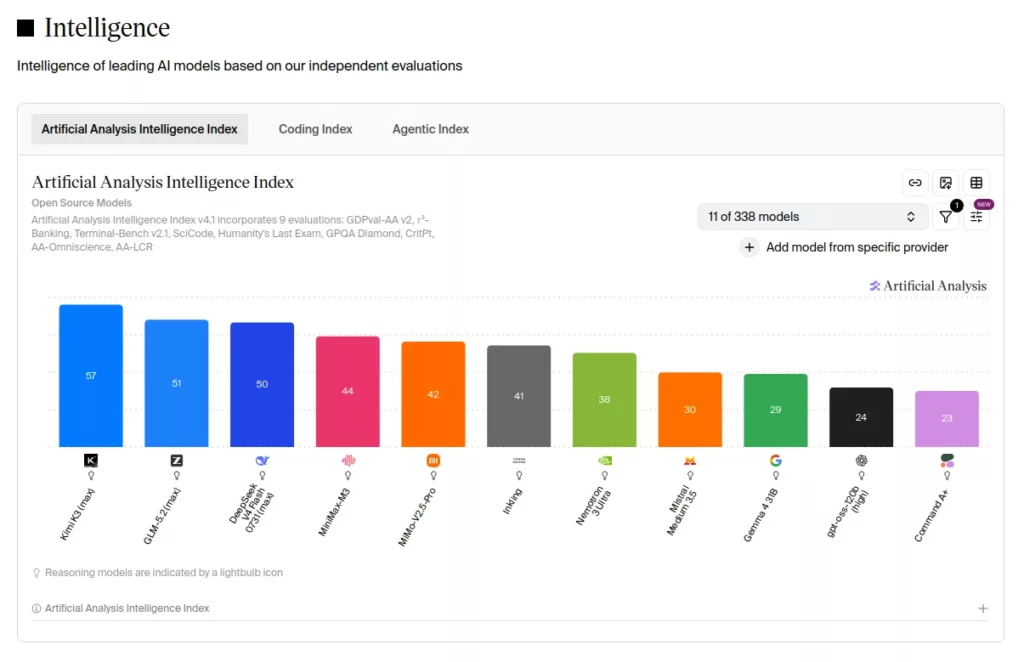
DeepSeek-V4-Flash-0731 scored 50 points on the Artificial Analysis Intelligence Index. This score ranks 3rd among open-weight models.
- 1. Kimi K3 (max)
- Intelligence Index: 57
- Total Params: 2800B
- Active Params: 104B
- 2. GLM-5.2 (max)
- Intelligence Index: 51
- Total Params: 744B
- Active Params: 40B
- 3. DeepSeek-V4-Flash-0731 (max)
- Intelligence Index: 50
- Total Params: 284B
- Active Params: 13B
- 4. MiniMax-M3
- Intelligence Index: 44
- Total Params: 428B
- Active Params: 23B
- 5. MiMo-V2.5-Pro
- Intelligence Index: 42
- Total Params: 1020B
- Active Params: 42B
- 6. Inkling
- Intelligence Index: 41
- Total Params: 975B
- Active Params: 41B
- 7. Nemotron 3 Ultra
- Intelligence Index: 38
- Total Params: 550B
- Active Params: 55B
- 8. Mistral Medium 3.5
- Intelligence Index: 30
- Total Params: 128B
- Active Params: 128B
- 9. Gemma 4 31B
- Intelligence Index: 29
- Total Params: 30.7B
- Active Params: 30.7B
- 10. gpt-oss-120b (high)
- Intelligence Index: 24
- Total Params: 117B
- Active Params: 5.1B
- 11. Command A+
- Intelligence Index: 23
- Total Params: 218B
- Active Params: 25B
When we examine DeepSeek-V4-Flash-0731‘s position in this ranking alongside the parameter counts of the models, an exceptional picture emerges. The two models ahead of it have much larger structures: Kimi K3, with 2.8 trillion parameters, is approximately 10 times the size of Flash and performs 8 times more computation per token with 104 billion active parameters. GLM-5.2, with 744 billion total and 40 billion active parameters, is approximately 2.6 times the size of Flash. Despite this, Flash is only 1 point behind GLM-5.2 on the general intelligence index.
An even more striking picture emerges when we examine the models ranked below Flash. Among the top 9 models — those with an Intelligence Index of 29 and above — Flash has the fewest active parameters. All other MoE models in the ranking use both more total and more active parameters. To find the first model with fewer active parameters than Flash, you have to go down to the 10th place, gpt-oss-120b. There, we see the model’s intelligence index is 24 — less than half of Flash’s.
This table has a direct implication for local inference: Parameter count is a measure of model size. Size is directly related to the memory and compute capacity required to run the model. When you choose another model from the list to achieve intelligence performance at the Intelligence Index 50 level, you need larger hardware to run it. For example, in our previous tutorials, we used 4 DGX Sparks to run GLM-5.2. Kimi K3’s 2.8 trillion parameters would require much larger hardware. DeepSeek-V4-Flash-0731, with only 284 billion total and 13 billion active parameters, is the only model at this intelligence level that can run on two DGX Sparks.
4. Coding Index
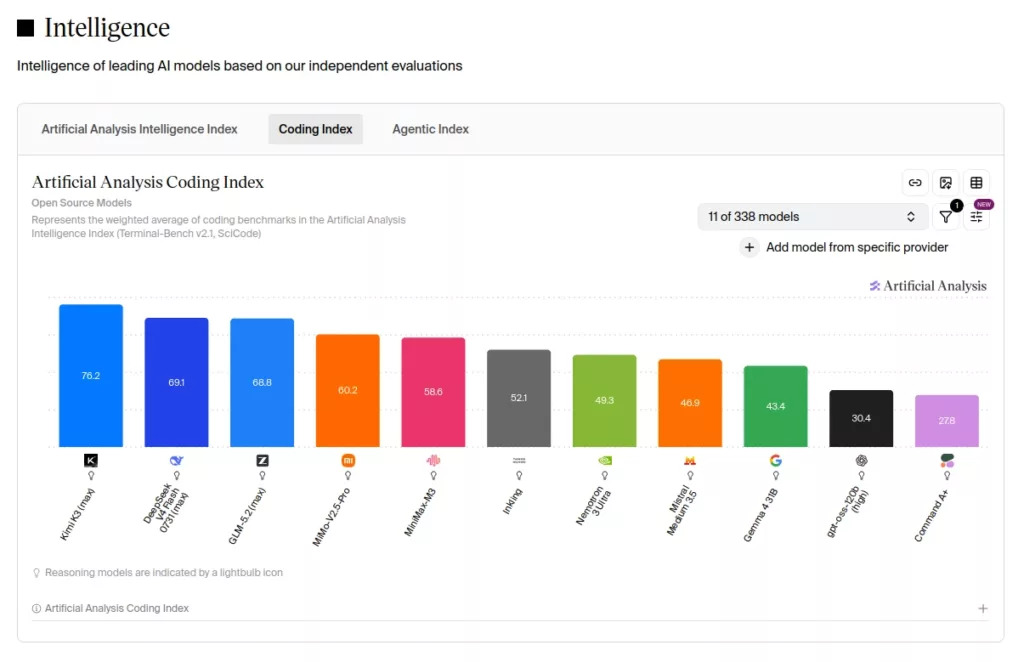
The Coding Index is the weighted average of the Terminal-Bench v2.1 and SciCode tests. These tests measure the model’s performance on coding problems and agent skills. DeepSeek-V4-Flash-0731 ranks 2nd among open-weight models in coding.
- 1. Kimi K3 (max)
- Coding Index: 76.2
- 2. DeepSeek-V4-Flash-0731 (max)
- Coding Index: 69.1
- 3. GLM-5.2 (max)
- Coding Index: 68.8
- 4. MiMo-V2.5-Pro
- Coding Index: 60.2
- 5. MiniMax-M3
- Coding Index: 58.6
- 6. Inkling
- Coding Index: 52.1
- 7. Nemotron 3 Ultra
- Coding Index: 49.3
- 8. Mistral Medium 3.5
- Coding Index: 46.9
- 9. Gemma 4 31B
- Coding Index: 43.4
- 10. gpt-oss-120b (high)
- Coding Index: 30.4
- 11. Command A+
- Coding Index: 27.8
DeepSeek-V4-Flash-0731 scores 69.1 on the Coding Index.
The following GLM-5.2 stays at 68.8 — meaning Flash surpassed
even GLM-5.2, which is 2.6 times its size, to claim second place.
5. Agentic Index
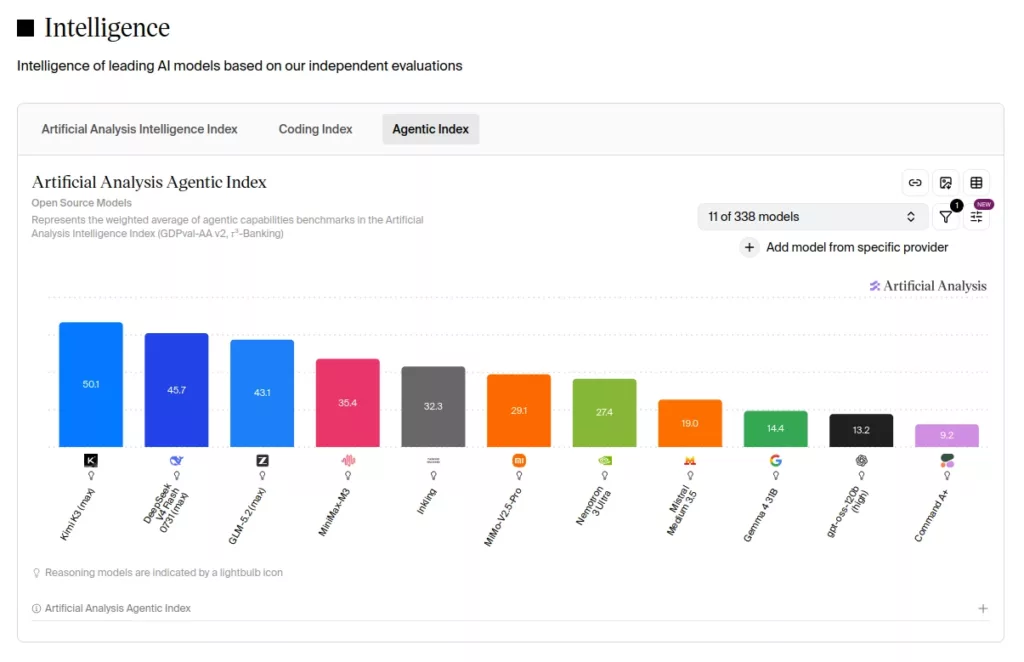
The Agentic Index is the weighted average of the GDPval-AA v2 and
τ³-Banking tests. It measures the model’s agentic capability.
Agentic capability indicates how well the model performs as an autonomous agent —
doing web research, running terminal commands, and writing code.
Similar to what we saw in the Coding Index,
DeepSeek-V4-Flash-0731 also ranks 2nd
among open-weight models in this area, with 45.7 points.
- 1. Kimi K3 (max)
- Coding Index: 76.2
- 2. DeepSeek-V4-Flash-0731 (max)
- Coding Index: 69.1
- 3. GLM-5.2 (max)
- Coding Index: 68.8
- 4. MiMo-V2.5-Pro
- Coding Index: 60.2
- 5. MiniMax-M3
- Coding Index: 58.6
- 6. Inkling
- Coding Index: 52.1
- 7. Nemotron 3 Ultra
- Coding Index: 49.3
- 8. Mistral Medium 3.5
- Coding Index: 46.9
- 9. Gemma 4 31B
- Coding Index: 43.4
- 10. gpt-oss-120b (high)
- Coding Index: 30.4
- 11. Command A+
- Coding Index: 27.8
DeepSeek-V4-Flash-0731 scores 69.1 on the Coding Index.
The following GLM-5.2 stays at 68.8 — meaning Flash surpassed
even GLM-5.2, which is 2.6 times its size, to claim second place.
5. Agentic Index
The Agentic Index is the weighted average of the GDPval-AA v2 and
τ³-Banking tests. It measures the model’s agentic capability.
Agentic capability indicates how well the model performs as an autonomous agent —
doing web research, running terminal commands, and writing code.
Similar to what we saw in the Coding Index, DeepSeek-V4-Flash-0731
also ranks 2nd among open-weight models in this area, with
45.7 points.
Setup
Prerequisites
Previous tutorials covered the processes of connecting to the Spark, installing sparkrun, and configuring a multi-Spark cluster step by step. In this tutorial, we assume all these steps have been completed and your setup is ready.
This tutorial requires 2 DGX Sparks. We will refer to the primary device as the and the other device as . Note the IP address of each device beforehand.
Downloading the Docker Image
DeepSeek-V4-Flash-0731’s MoE architecture and MLA (Multi-Head Latent Attention) structure require kernels compiled for GB10 (SM 12.1). Standard vLLM images do not include these kernels. Therefore, we will use a custom Docker image that includes the required B12X kernels.
Run the following command to pull the Docker image prepared by OpenZeka:
Verify the image:
2. Preparing the Recipe
A recipe is a YAML file that defines how sparkrun will run the model. The model, Docker image, vLLM flags, and memory settings are all consolidated in a single file. For DeepSeek-V4-Flash-0731, this recipe uses tensor parallelism across 2 nodes (two Sparks share the model weight matrices), runs the model with the maximum context window, and accelerates model inference with DSpark speculative decoding (k=5).
Save the recipe file using the following command:
Verify the file:
You will see the recipe file you saved.
Running
1. Clearing the Cache
Before starting vLLM, flush the filesystem cache on each Spark. The main reason for doing this is the DGX Spark’s unified memory architecture (UMA): the operating system caches model files read from disk in RAM. vLLM loads the model weights from here into GPU memory. After loading is complete, the cached data remains in RAM even though it will not be used again. On systems with separate memory, this is not significant — since inference runs in GPU memory, RAM utilization does not affect performance. On the Spark, however, the CPU and GPU share the same RAM, so the cache reduces the memory available to the GPU. This command frees the cache, providing maximum memory for vLLM.
Clear the cache on the Main Spark:
From the Main Spark, apply the same cleanup on the Worker Spark via SSH:
2. Pre-launch Checks
Verify that sparkrun correctly parsed the recipe and that the memory budget is suitable:
sparkrun correctly parsed the recipe, selected vllm-distributed, and confirmed ‘DGX Spark fit: YES’.
3. Starting the Model
Now let’s start the model:
sparkrun automatically synchronizes the image to the Worker (skips if same ID), downloads the model to the head node and distributes it to the Worker (skips if already present), configures NCCL for CX-7 interfaces, and launches containers on each Spark.
sparkrun successfully completed all 6 steps. ‘Mode: cluster (2 nodes)’ was observed. sparkrun synchronized the image to the Worker over the CX-7 network. All flags were correctly resolved within the serve command.
After the model download is complete, it may take a few minutes for vLLM to become ready for serving. During this process, vLLM loads the model weights into GPU memory, compiles GPU kernels, and allocates memory for inference.
To watch vLLM logs:
You will see the following in the logs:
Once you see the Application startup complete. line, the model server is ready.
Finally, verify that the server is running:
The ‘HTTP 200’ response indicates that the server is healthy.
DeepSeek-V4-Flash-0731 is now running and serving from port 8000 on the Main Spark.
Benchmark
We tested the DeepSeek-V4-Flash-0731 model running on two Sparks at different concurrency levels. The measurements recorded average TTFT (Time to First Token — time to start producing the first token) and TPS (Tokens Per Second — number of tokens produced per second) values.
| Concurrency | Avg TTFT (ms) | Avg TPS (tok/s) |
|---|---|---|
| 1 | 308 | 47.3 |
| 2 | 416 | 32.4 |
| 4 | 532 | 22.5 |
| 8 | 686 | 15.7 |
The measurements were taken using the CordatusAI LLM Benchmark Tool. This tool is a benchmarking application developed by CordatusAI that tests LLM servers with OpenAI-compatible APIs. As can be seen, at single concurrency, the value exceeded 47 tokens per second.
Using with OpenCode
OpenCode is an open-source AI coding assistant that runs from the terminal. It has features such as writing code, editing files, running terminal commands, and analyzing codebases. Unlike cloud services, OpenCode runs on your own computer and you choose which LLM it works with.
If you want to take advantage of the coding and agentic capabilities of the DeepSeek-V4-Flash-0731 model, you can connect OpenCode to this model to get a local coding assistant.
1. Installation and Configuration
Install OpenCode on your computer:
Verify the installation:
Save the following JSON to ~/.config/opencode/opencode.json. Create the file if it doesn’t exist. Replace with your Spark’s IP address:
Important: If you already have a
~/.config/opencode/opencode.jsonfile on your computer, back it up to avoid losing it:cp ~/.config/opencode/opencode.json ~/.config/opencode/opencode.json.bak
2. Usage
Start OpenCode from the project directory you want to work in:
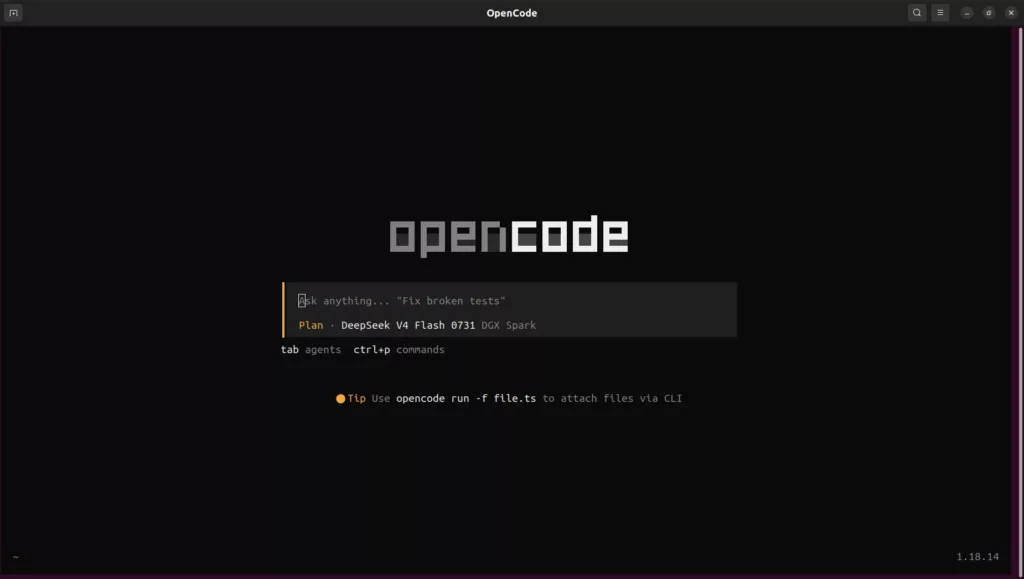
Type your message in the input box and press Enter to start chatting with the model:
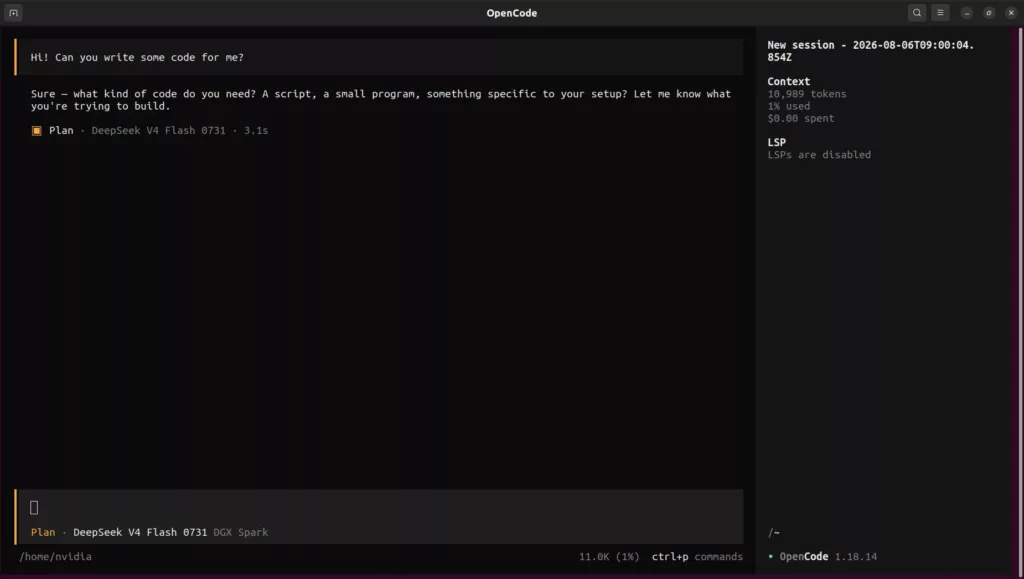
In OpenCode, you switch between Build and Plan modes with the Tab key. Start complex tasks in Plan mode. In this mode, OpenCode only has permissions for analysis, reading, research, and planning. Once you approve the plan, you can switch to Build mode. In this mode, file creation, editing, and command execution features are also enabled.
You can use OpenCode commands with /. Use /models to see available models, /sessions to switch to past sessions, and /undo to undo changes.
Use /help for other commands:
| Command | Description |
|---|---|
/models |
Lists available models, switches model |
/init |
Analyzes project, creates AGENTS.md |
/compact |
Compresses context |
/share |
Converts session to shareable link |
/export |
Exports session as Markdown |
/thinking |
Show/hide model’s chain of thought |
You can also reference files with @ in your messages and run terminal commands directly with !.
When you give a complex task, OpenCode first analyzes it:
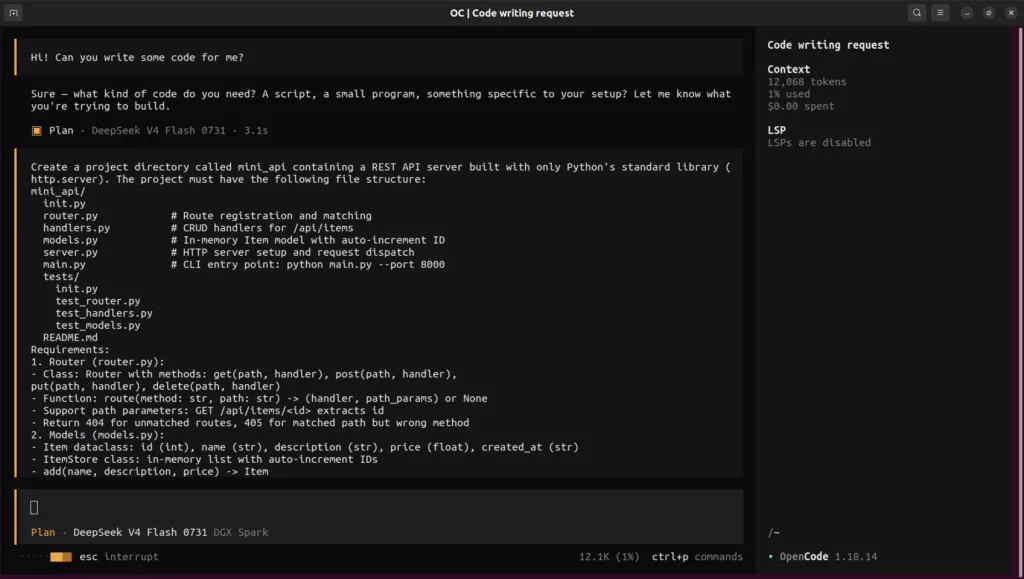
Then it presents an implementation plan and asks you questions about ambiguous points:
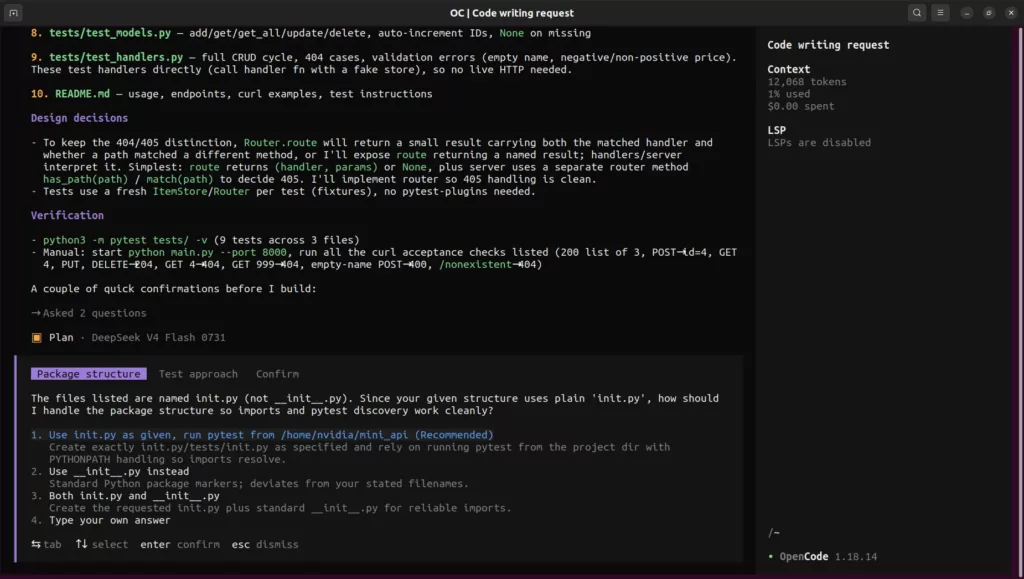
After answering the questions, you can switch to Build mode and allow file creation. After the model creates the files, you can verify the project:
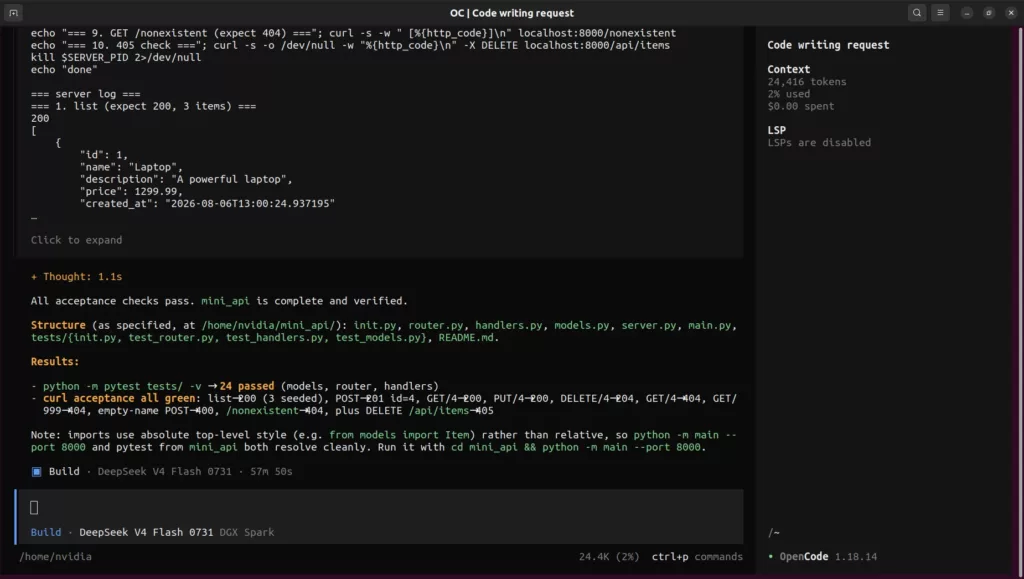
3. Example Usage
Now that you’ve learned OpenCode, let’s give a more challenging task to test the model’s coding and intelligence capabilities. Start a new session, switch to Build mode with Tab, and send the following prompt:
This prompt requires the model to correctly integrate multiple challenging topics within a single file, including vector-based physics, collision calculation with rotating objects, and Canvas API usage.
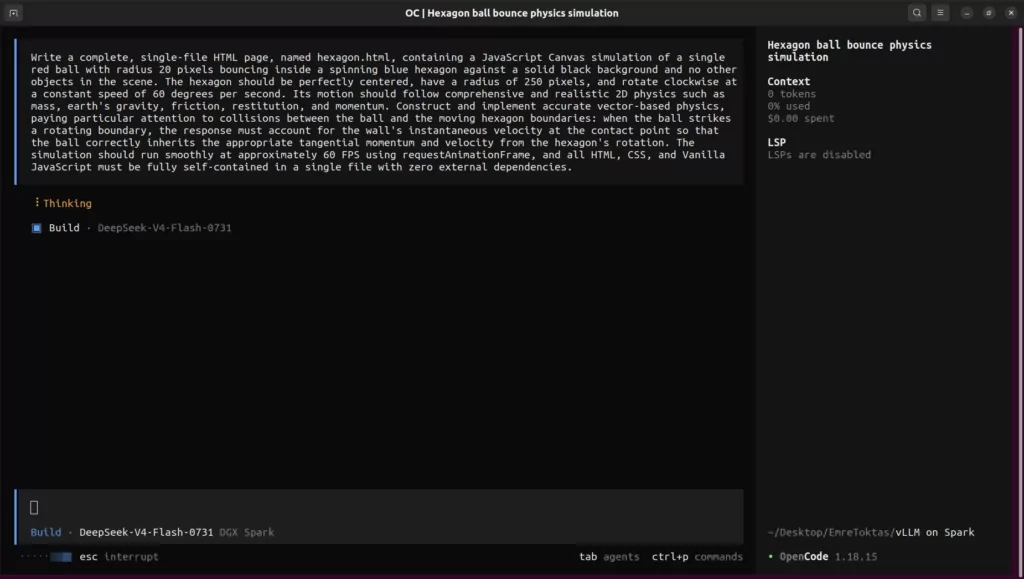
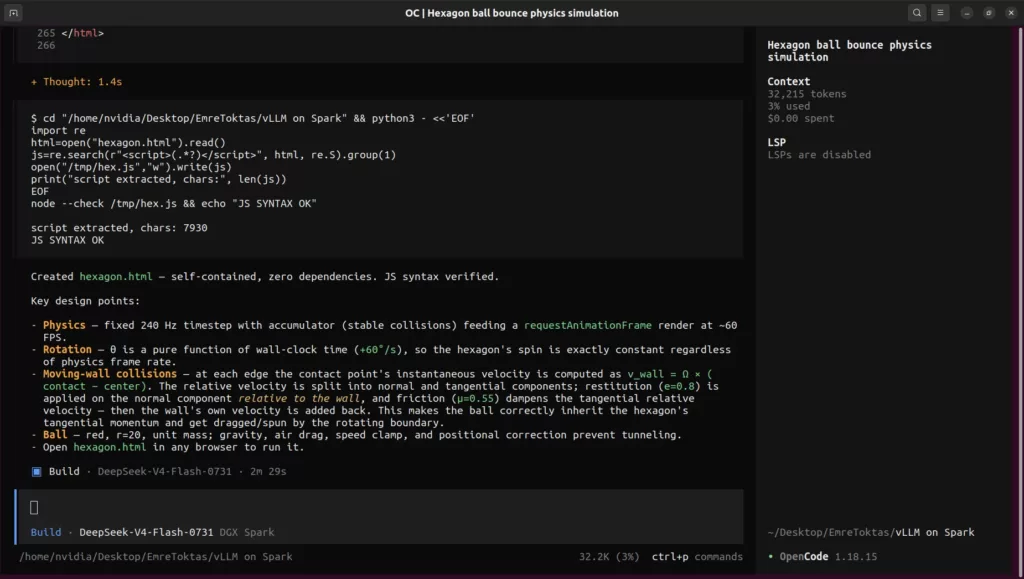
The model analyzes the prompt and starts creating the file:
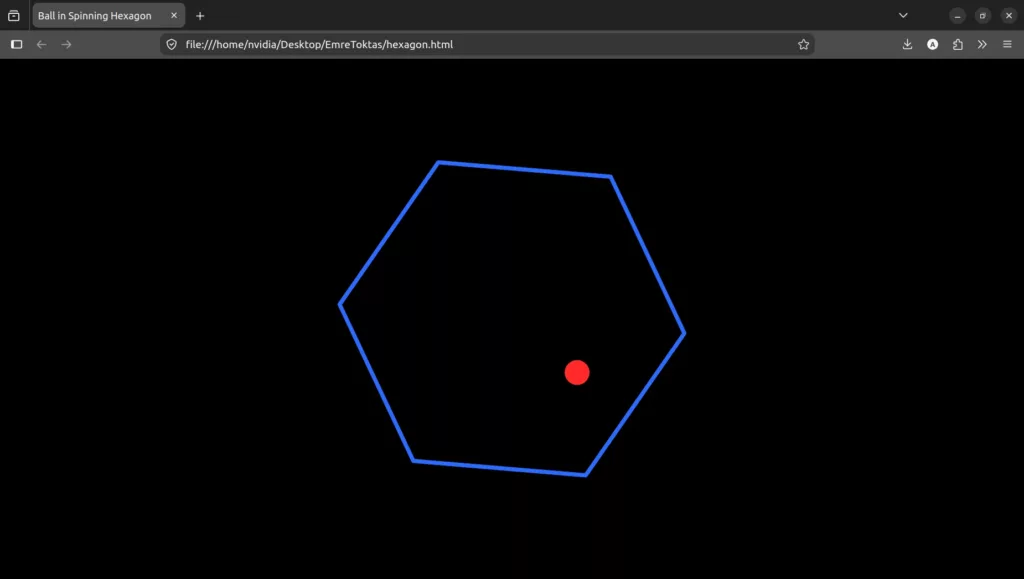
You can test the simulation by opening the generated hexagon.html file in your browser. You will see the ball bouncing inside the rotating hexagon following realistic physics rules:
You can also try the same prompt with other models and compare the results.
Shutdown
When you are done, stop the model:
This command stops the container and frees the memory. However, the container, Docker image, and model files remain on disk. Therefore, you do not need to re-download to restart — simply run the sparkrun run command from step 3 again.