Running GLM-5.2 on Four DGX Sparks
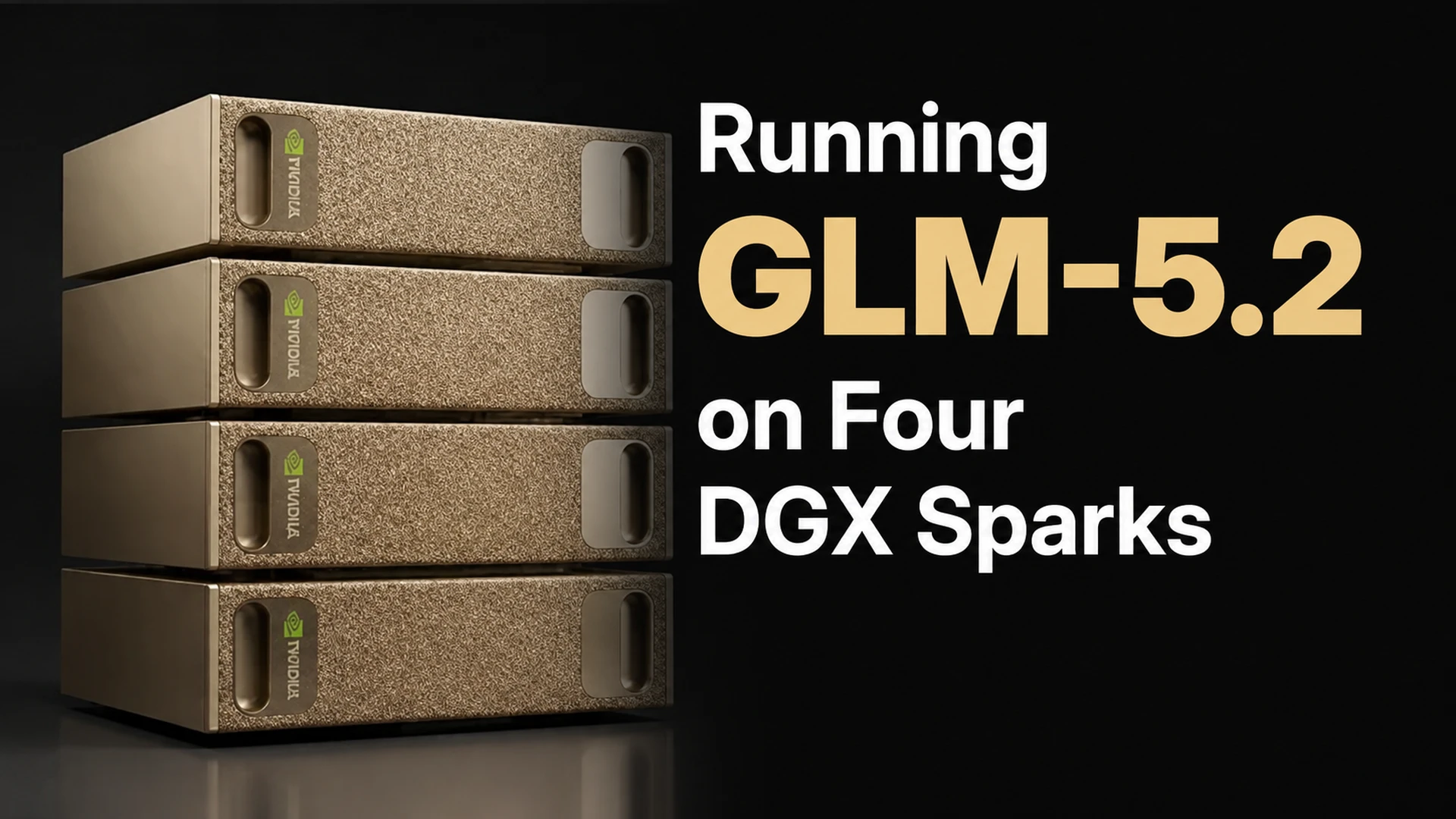
In this tutorial, we will run the GLM-5.2 large language model distributed across 4 DGX Spark units. We will use sparkrun for this purpose.
A Spark can be used directly as a computer by connecting a monitor and keyboard, or it can serve as a remote server accessed from another machine. In this tutorial, we will connect to the Spark remotely, install the necessary software, and run the model.
We will use GLM-5.2 as the language model (a Mixture-of-Experts model with 744 billion parameters, ~40 billion active parameters, int4/int8 quantization), vLLM as the inference engine, and sparkrun as the management tool. vLLM will load the model’s trained weights into GPU memory and serve an API that accepts requests from outside. sparkrun will manage Docker containers and model distribution across the Sparks via the command line. This automates image synchronization, model transfer, and cluster configuration. Both will run on the Main Spark inside Docker containers.
This tutorial consists of three parts:
- Setup: Downloading the Docker image and preparing the recipe
- Running: Starting, monitoring, testing, and shutting down the model on 4 Sparks
- Benchmark: Performance measurement at different concurrency levels
Throughout this tutorial, the main device is called the Main Spark, and the other devices are called Worker Sparks.
Setup
Prerequisites
Previous tutorials covered connecting to the Spark, installing sparkrun, and configuring a multi-Spark cluster step by step. In this tutorial, we assume all these steps have been completed and your setup is ready.
This tutorial requires 4 DGX Sparks. We will refer to the main device as <main-spark-ip>, and the other three devices as <worker-spark-ip-1>, <worker-spark-ip-2>, and <worker-spark-ip-3>. Note each device’s IP address beforehand.
1. Downloading the Docker Image
GLM-5.2’s DeepSeek Sparse Attention (DSA) architecture requires kernels compiled for GB10 (SM 12.1). Standard vLLM images do not include these kernels. Therefore, we will use a custom Docker image that contains the necessary patches.
Run the following command to pull the Docker image prepared by OpenZeka:
Verify the image:
2. Preparing the Recipe
The recipe is a YAML file that defines how sparkrun will run the model. The model, Docker image, vLLM flags, and memory settings are consolidated in a single file. For GLM-5.2, this recipe uses tensor parallelism (model weight matrix partitioning) and decode context parallelism (KV cache and attention computation partitioning) across 4 nodes.
Save the recipe file using the following command:
Verify the file:
You will see the recipe file you saved.
Running
1. Clearing the Cache
Before starting vLLM, clear the filesystem cache on each Spark. The main reason for this is the DGX Spark’s Unified Memory Architecture (UMA): The operating system caches model files read from disk in RAM. vLLM loads the model weights from here into GPU memory. After loading completes, the cached data is not used again, but it is not freed immediately either. On systems with separate memory, this is not important. Since inference runs in GPU memory, RAM utilization does not affect performance. On the Spark, however, since the CPU and GPU share the same RAM, the cache reduces the space available to the GPU. The command clears this cache, providing maximum memory for vLLM.
Clear the cache on the Main Spark:
Apply the same cleanup on the Worker Sparks via SSH from the Main Spark:
2. Pre-launch Checks
Verify that sparkrun parsed the recipe correctly and that the memory budget is sufficient:
sparkrun parsed the recipe correctly, selected vllm-distributed, and confirmed with ‘DGX Spark fit: YES’. You can ignore the unknown dtype warnings — these are b12x/DCP-specific types that sparkrun does not recognize.
Now preview the launch plan:
The dry run succeeded. The recipe is valid, ‘Mode: cluster (4 nodes)’ is shown, and the serve command includes all flags. If the model is not installed on the Spark, sparkrun will automatically download it from Hugging Face on first launch. The dry run does not trigger this download; downloading only happens during an actual launch.
3. Starting the Model
Now let’s start the model:
The –no-follow flag makes sparkrun return to the command line after launching the containers. sparkrun automatically synchronizes the image to the Workers (skips if same ID), downloads the model to the head node and distributes it to the Workers (skips if already present), configures NCCL for the CX-7 interfaces, and launches a container on each Spark.
sparkrun completed all 6 steps successfully. ‘Mode: cluster (4 nodes)’ is shown. sparkrun synchronized the image to 3 Workers over the CX-7 network and downloaded the model from Hugging Face and distributed it to 4 nodes. All flags in the serve command resolved correctly.
4. Monitoring the Startup Process
After model downloading completes, it may take a few minutes for vLLM to become ready for serving. During this process, vLLM loads the model weights into GPU memory, compiles GPU kernels, and allocates memory for inference.
To view vLLM logs:
You will see the following in the logs:
If you see the Application startup complete. line, the model server is ready. Press Ctrl+C to stop watching logs. The server will continue running in the background.
The startup process takes approximately 10 minutes. During this process:
- The architecture is resolved as GlmMoeDsaForCausalLM (DeepSeek Sparse Attention + MoE).
- The MTP draft model (DeepSeekMTPModel) is initialized — speculative decoding is active (k=4).
- The B12X_MLA_SPARSE attention backend is selected — DeepGEMM is skipped.
- 128 safetensors shards are loaded (~5 minutes, 96.71 GiB per node).
- The draft model is loaded as 4 shards (~8 seconds).
- torch.compile takes ~38 seconds (backbone) + ~6 seconds (eagle head).
- CUDA graph capture succeeds in FULL + PIECEWISE modes (14 seconds).
- KV cache: 8.38 GiB, 657,664 tokens, 5.02× concurrency for 131K tokens.
5. Testing the Model
First, verify that the server is running:
An ‘HTTP 200’ response indicates the server is healthy. Now check the sparkrun container status:
All four containers are running.
List the registered models:
The model is registered as glm-5.2.
Now test the model with a simple “What is 2+2?” prompt:
The simplified response will be as follows. In the content field (the model’s response), you will see “2+2, 4 eder.” From this, you can see that the model performed the addition correctly. Additionally, the response has a reasoning field. This field contains the model’s thinking process:
The LLM is now running and serving from the Main Spark’s port 8210. We can ask GLM-5.2 questions and receive responses. You can use the model with a web interface (e.g., Open WebUI) or an agent architecture (e.g., OpenCode).
6. Shutdown
When you are done, stop the model:
This command stops the container and frees the memory space. However, the container, Docker image, and model files remain on disk. This way, you do not need to download them again to restart. Simply run the sparkrun run command from step 3 again.
Benchmark
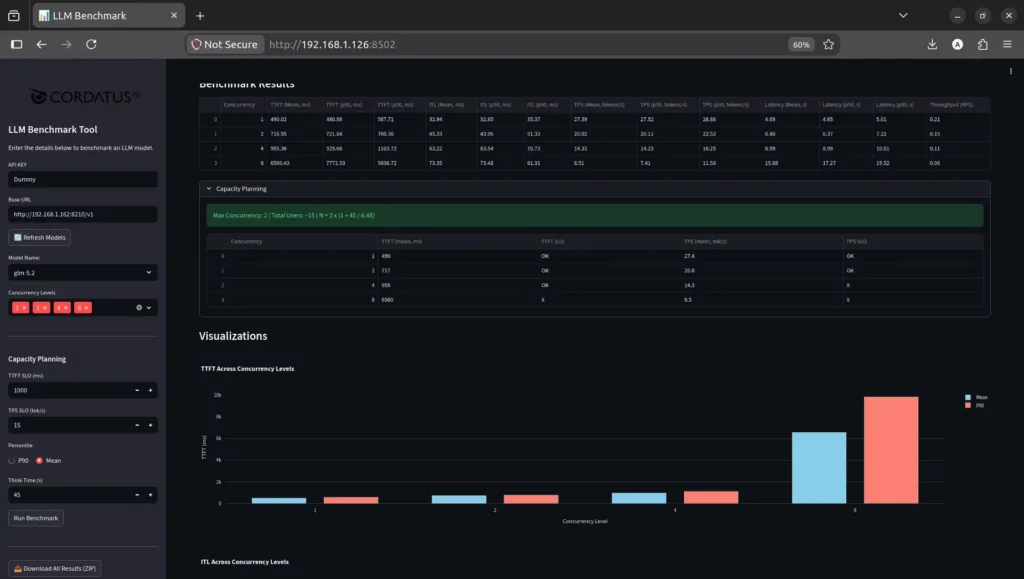
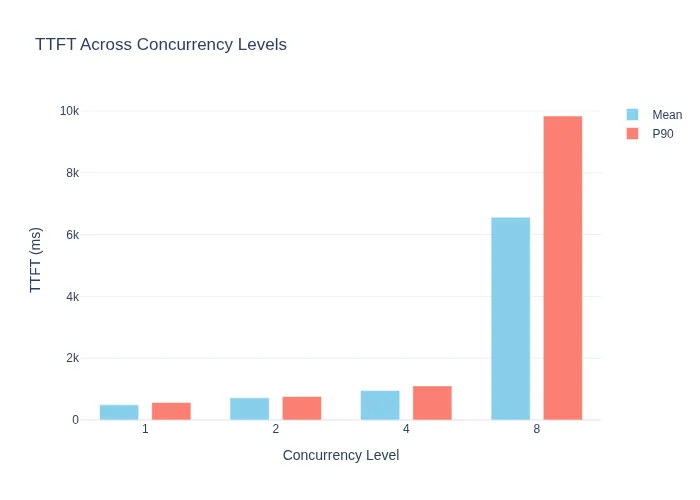
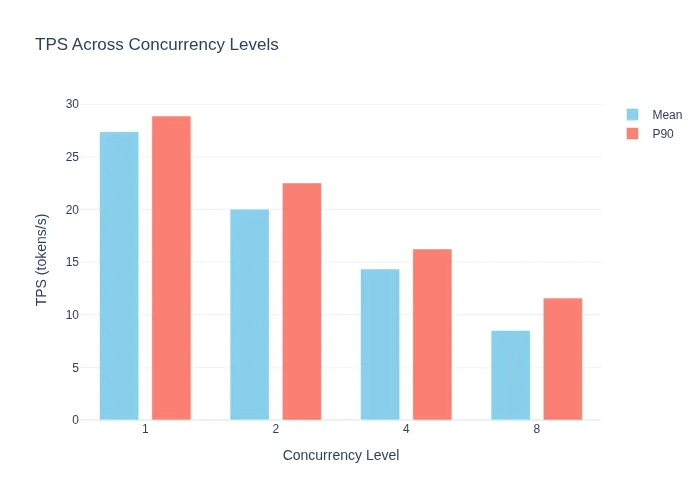
We tested the GLM-5.2 model at different concurrency levels. The measurements recorded average TTFT (Time to First Token) — the time until the first token is produced — and TPS (Tokens Per Second) — the number of tokens generated per second. As can be seen, the value exceeded 27 tokens per second.
| Concurrency | Avg TTFT (ms) | Avg TPS (tok/s) |
|---|---|---|
| 1 | 490 | 27.4 |
| 2 | 717 | 20.0 |
| 4 | 955 | 14.3 |
| 8 | 6560 | 8.5 |
The measurements were taken using the CordatusAI LLM Benchmark Tool. This is a benchmarking application developed by CordatusAI that tests LLM servers with OpenAI-compatible APIs. Below, you can see the web interface of our benchmark tool and the various charts it produced: